
Capacity Planning
See how many people each visit requires, how many are assigned, and how many are still needed. Understand committed demand and workforce availability without manual counting.
CAPACITY PLANNING FOR

Independent capacity planning software built for Jobber users.
Know how many people you need, who's already assigned, and where staffing gaps remain. Jobber Capacity Dashboard brings daily scheduling and workforce planning together in one clear view—built for busy service businesses and large teams.
Works with your existing Jobber account. No replacement scheduling system required.
When you're coordinating dozens of daily visits and a large field team, knowing what's scheduled is only part of the picture. You also need to know whether you can staff the work.
Jobber Capacity Dashboard puts those answers in one place.
Start with staffing demand, assigned capacity, missing crew, workforce availability, waitlisted work, and scheduling conflicts. Then see exactly which visits drive those numbers.
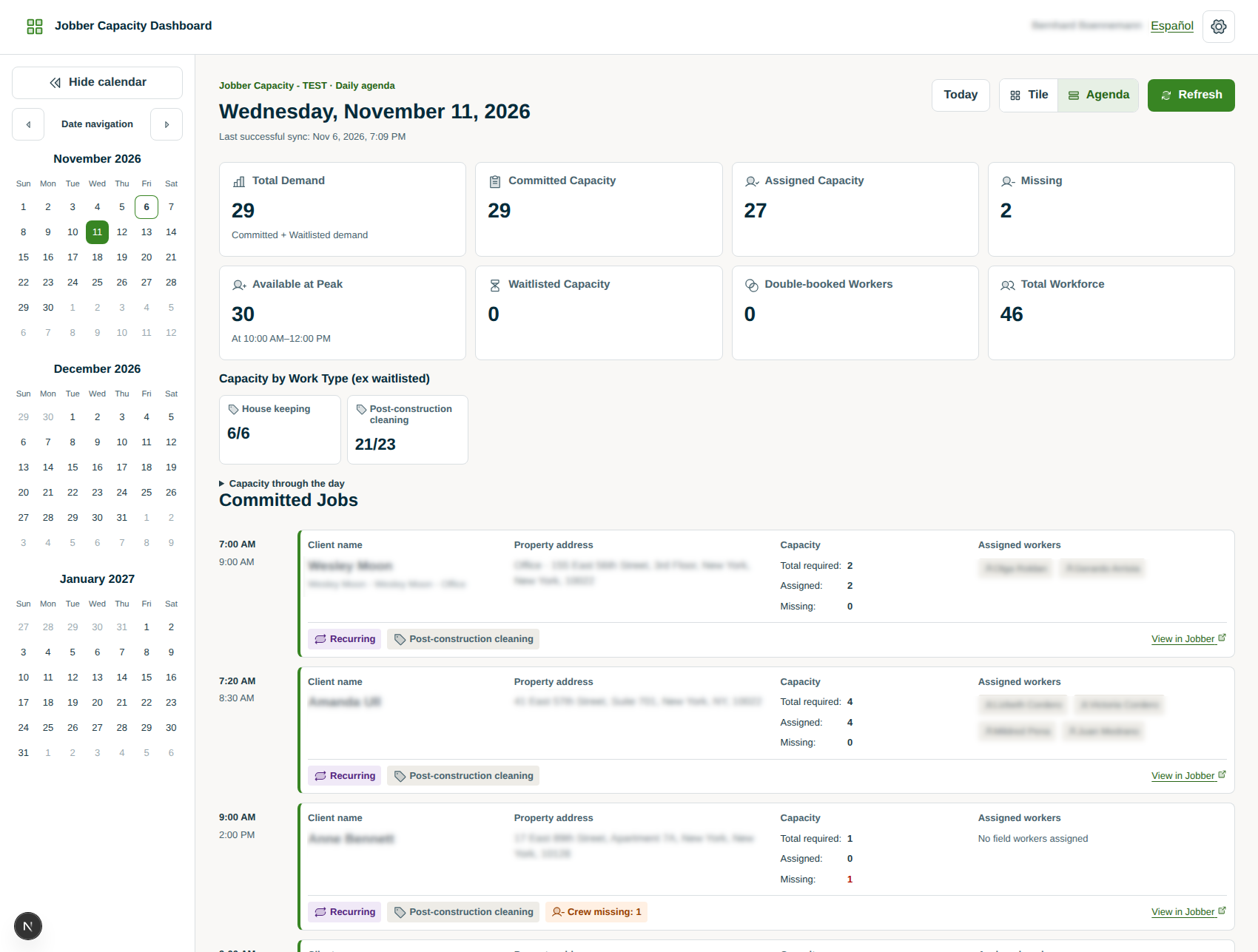
See how many people each visit requires, how many are assigned, and how many are still needed. Understand committed demand and workforce availability without manual counting.
Navigate crowded calendars with two optimized single-day layouts. Agenda View organizes detailed visits for fast scanning; Tile View provides a compact visual overview.
See warnings when workers are assigned to overlapping visits so dispatchers can identify and resolve scheduling conflicts before they disrupt the day.
Keep tentative work separate from committed jobs. Track waitlisted staffing demand in its own KPI and agenda section without inflating committed requirements.
Understand staffing demand by service category—such as housekeeping, post-construction cleaning, and other work types defined in your Jobber account.
Get a clear daily overview of total demand, committed and waitlisted capacity, assigned workers, missing crew, workforce size, peak availability, and double bookings.
Choose how required staffing is determined—from staffing markers or mapped Jobber job custom fields. Configure how your company identifies waitlisted work and determines waitlisted capacity.
Jobs, visits, and assignments stay in Jobber. The dashboard securely retrieves the information it needs to show scheduling and capacity in one place. Data refreshes on dashboard load/reload, date changes, and manual Refresh.
Give authorized schedulers, dispatchers, and supervisors a shared view. Clear indicators and English/Spanish support keep everyone aligned. Admins manage company configuration and team access.
Job custom fields are job-level values. A required-capacity field set on a job applies to all its visits; visit-specific exceptions are not independently represented by that field.
Privacy comes first We use the information needed to operate your dashboard. Your business data is never sold or used for advertising.
Create your company account and authorize the connection to your Jobber account.
Choose a date and see visits, staffing demand, workforce assignments, and capacity metrics.
Find gaps, identify conflicts, and make staffing decisions while continuing to manage jobs in Jobber.
The dashboard is read-only. Manage jobs and scheduling changes in Jobber.
Whether you're coordinating cleaning crews, property maintenance teams, specialty contractors, or other field service professionals, staffing capacity affects your ability to deliver. Jobber Capacity Dashboard is especially valuable when you manage large field teams, high daily visit volumes, recurring services, variable crew sizes, or waitlisted appointments.
Your business already runs on Jobber. Give your team the visibility to plan staffing and capacity with confidence.
See more. Plan better. Get more done.
Jobber Capacity Dashboard is independently developed by Orchard 9 to complement Jobber.
Explore practical guides to capacity planning for Jobber, from first connection to staffing calculations.